Team goal tracking software should do one thing well: show whether the team is on course for its goals without anyone having to type a percentage. The best tools let you set objectives with measurable key results, give each one an owner, put the work underneath, and read progress from that work. When you compare OKR software or a goal tracking app, check five things: whether progress is computed or typed, whether goals link to real tasks and results, whether changes to targets are recorded, who can see what, and whether the goals feed your one-to-ones and reviews.
Key takeaways
- The most common failure in goal tracking is progress that's typed in, not read from the work. It's always optimistic, and always late.
- Every key result needs a start, a target, a current value and one owner.
- A goal tool should keep the history: who changed a target, when and why.
- Some key results can move straight from the work (tasks done, money collected); others need a person's check-in with a reason. Know which is which.
- Goals that aren't read in one-to-ones and reviews stop being goals by the second month.
What team goal tracking software should actually do
Most goal frameworks, OKRs included, share one structure. An objective says what you want to achieve. Key results say how you'll know you've achieved it; John Doerr's OKR resource describes them as "measurable and verifiable" (What Matters). Under the key results sits the work that moves them.
The software's job is to keep those three layers joined. A goal that isn't joined to its work becomes a sentence on a slide. Work that isn't joined to a goal becomes busyness. The tool should make the link easy to draw and hard to lose.
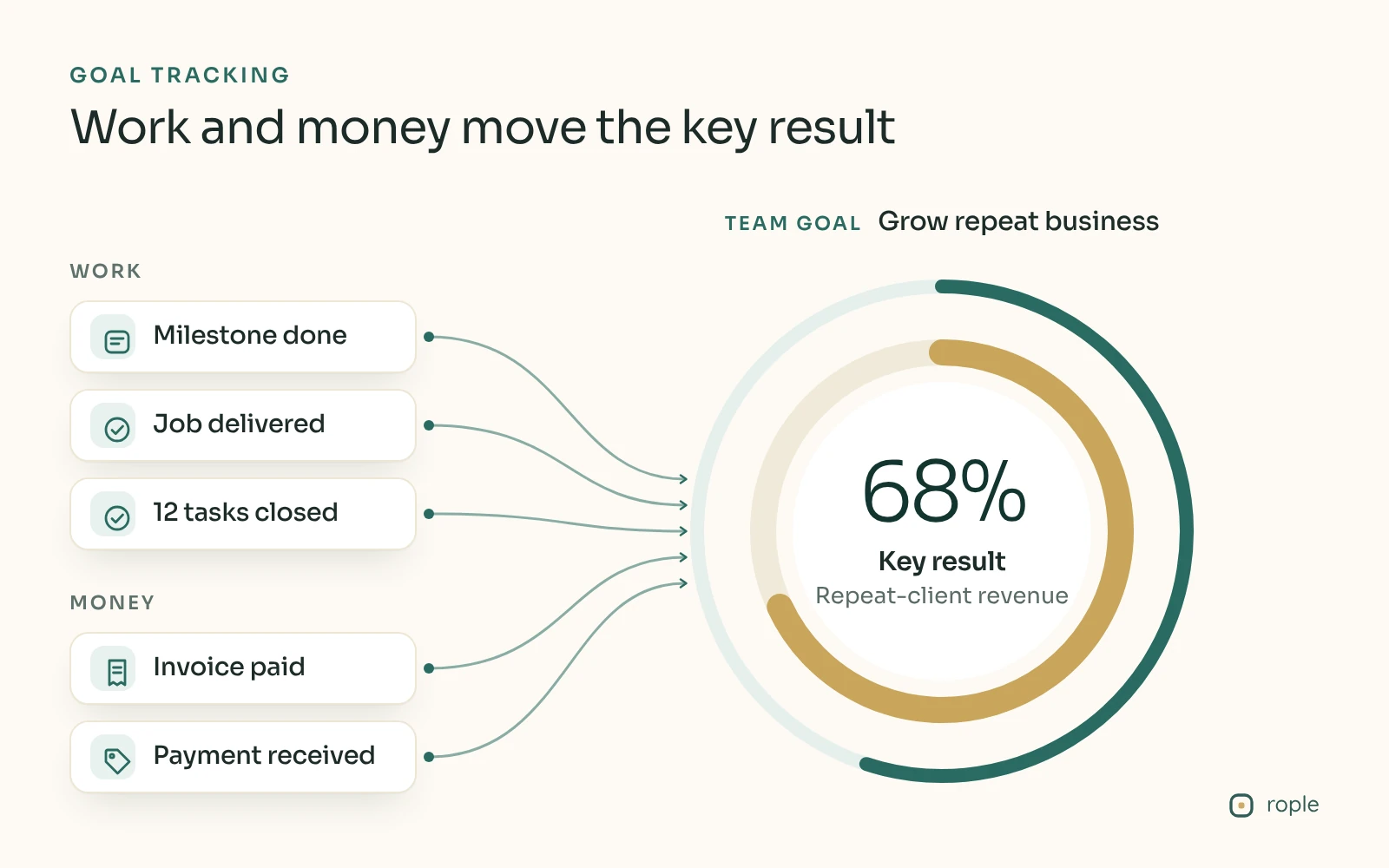
Work and money records move the key result. The figures are a sample, for illustration.
The buying checklist for team goal tracking software
Use this list when you trial any OKR software or goal tracking app.
Structure
- Objectives with two to five key results each, and work (tasks or projects) underneath
- Key results with a starting value, a target and a current value, not just a percentage
- One named owner for every objective and every key result
- Scope: company, department, team and individual goals, with clear rules for who sees each
- A way to link goals across teams, with both sides agreeing to the link
How progress moves
- Objective progress computed from its key results, not typed
- Key results that can move from the work: tasks completed, deals won, money collected
- Check-ins on key results that need a person's judgement, with a reason attached to each update
- A clear definition of "on track" that accounts for time. Half done is great in week one and a problem in week eleven
Honesty and history
- A record of every change to a target, with who changed it and when
- Goals belong to a cycle (a quarter, say), and a finished cycle keeps where each goal ended
- A way to mark a goal blocked that tells someone who can help, not just a red label
Fit with how you manage
- Goals visible in one-to-ones and reviews, so they're discussed, not just stored
- KPIs (things measured continuously) kept apart from objectives (things achieved once)
- A price and a set-up time that fit your team. A five-person team doesn't need an enterprise rollout
Why goal tracking fails: the common failure modes
Progress that's typed in, not read from the work
This is the big one. In many tools, someone updates a progress bar by hand: "I'd say we're about 60% there." The number is a feeling, it's updated when someone remembers, and it drifts upwards until the last fortnight of the quarter, when it falls off a cliff. Managers call these watermelon goals: green on the outside, red inside.
The fix is to make the number come from somewhere. If the key result is "20 new clients onboarded", count the onboarded clients. If it's "collect the quarter's target from our top ten accounts", count the money that arrives. When progress is computed, nobody can be optimistic on the team's behalf, and nobody has to remember to update it.
Goals with no work under them
A key result with no tasks under it has nothing to move it. It sits at zero, or at whatever someone typed, until the review. Every key result should have at least one piece of real work beneath it with an owner and a date.
Too many goals
Ten objectives with five key results each is fifty things to watch, which means none of them are watched. A rule of thumb many teams use: one to three objectives per team per quarter, two to four key results each.
Activity dressed up as results
"Make 200 sales calls" is a task list, not a key result. It measures effort, and you can hit it while the business goes nowhere. Ask of every key result: if we hit this, will the objective actually be achieved?
Targets quietly rewritten
When a target can be changed without a trace, the end-of-quarter review measures nothing. A change mid-cycle can be perfectly sensible, but it should be recorded.
Goals nobody reads
Goals set in a planning day and never opened again aren't goals. If they don't come up in one-to-ones, team meetings and reviews, the team will learn, correctly, that they don't matter.
How Rople's goals move from the work
Rople is a workspace for your goals, your people and your work, and goals are where those three meet. Goals and KPIs are on every plan, including Free. Here's how progress moves.
Tasks move key results. Put tasks under a key result, each with an owner and a due date. Ticking a task moves its key result, and the objective's progress ring is computed from its key results. Nobody types a percentage for the objective. If an objective reads zero, nothing under it has moved yet.
Money moves account targets, on Pro. A target on a client account is a key result under a goal. The target counts either money collected (receipts from the account's engagements in the period, less refunds) or business booked (the contract value of engagements opened in the period). Rople keeps the key result's figure up to date from the account's engagements, so when a payment is recorded against a target counting money collected, the goal moves. A payment only moves a goal when such a target exists.
Projects can release what they promised. When a project is closed out as delivered, Rople lists every contribution it promised to a key result or KPI, already filled in. You accept it, or change the number and give a reason. Whether closing a project moves its key results this way is a workspace setting a workspace admin or the owner turns on.
Some key results still need a person, and that's fine. Client satisfaction or a quality score can't be counted from tasks. For those, a check-in logs where the number is now and why, and that history becomes something a review can read.
The rest of the checklist, in Rople's terms:
- Every key result has a starting point, a target and a current value.
- Changing a target mid-cycle is allowed, and the change is part of the record.
- An objective's due date decides which cycle it belongs to, and Goals › Cycles groups objectives by cycle with their average progress.
- Marking a goal blocked tells the owner and their manager in the inbox.
- Alignment links are drawn by one side and accepted by the other; proposed links are drawn dashed. Nothing is assumed from scope.
- KPIs are kept apart from objectives and judged as a rate (the latest reading) or cumulative (the total), so a year's revenue isn't read as September's.
- On Starter, objective progress feeds Manager Cockpit and Reviews, so goals come up in the conversations that matter.
Every night Rople also checks for work past its date and tells whoever owns it, so a key result's tasks don't slip quietly.