Nov 1, 2026 · @Victor Ugwu
Every business owner starts the day with the same question: what actually needs me today, and where do we stand? Most teams answer it by opening five tabs. The CRM for leads that have gone cold. The project tracker for what is late. The finance sheet for who still owes money. WhatsApp for whatever somebody flagged last night. A to-do app for the list you wrote yourself. By the time you have stitched an answer together, it is 10 a.m. and you have not done any work yet.
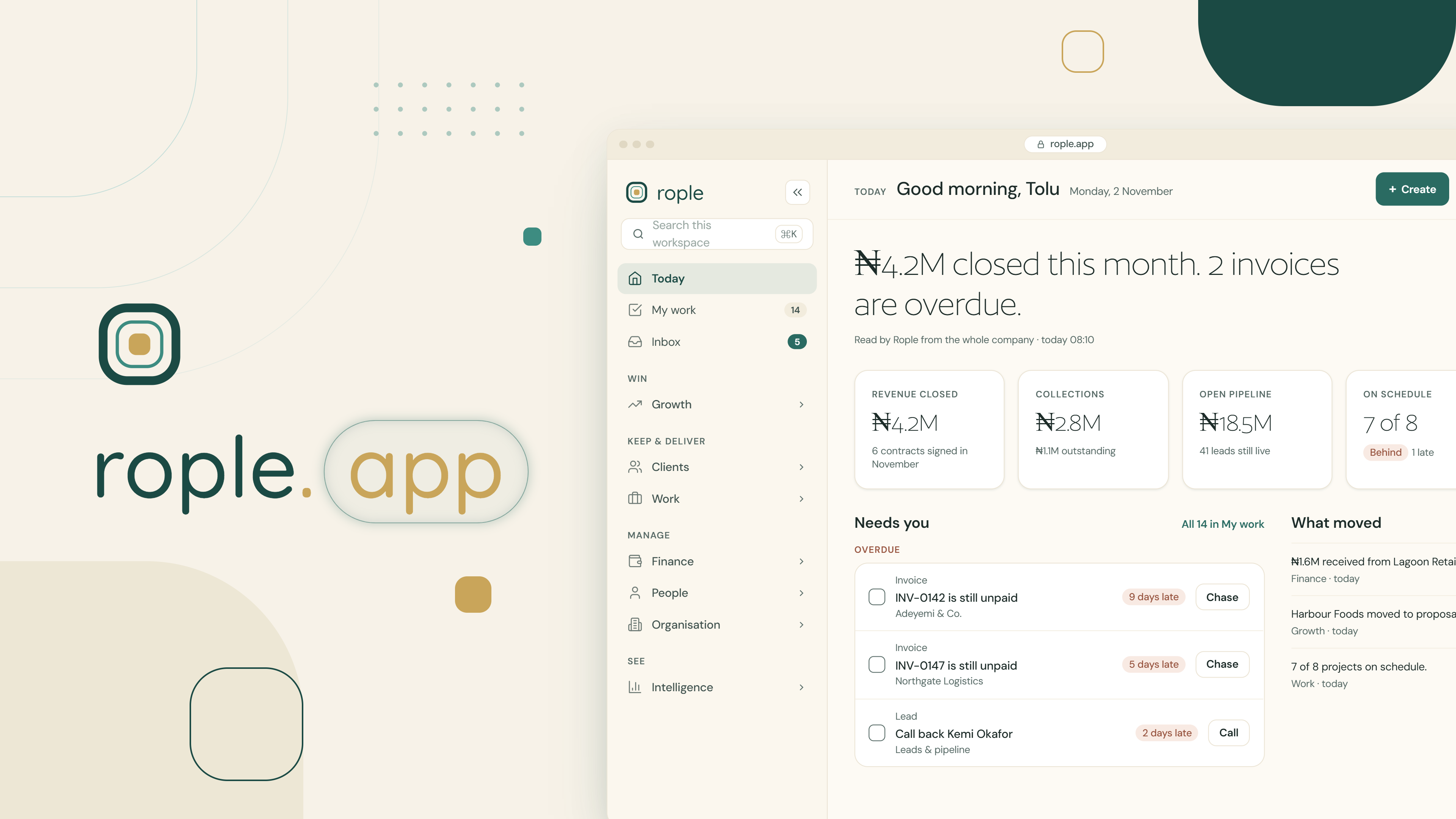
Rople's Today dashboard was built to end that ritual. It is the first screen you see when you open your workspace, and it answers two questions in one place: where does the business stand right now, and what is waiting on you. It does this without asking anyone to update a status, fill a report, or keep a second list. Every number on the page is read directly from the records your team already works in.
This post explains what the Today dashboard is, how it works under the hood, the problems it solves, and who gets the most out of it.
What Is the Today Dashboard in Rople?
The Today dashboard is the home screen of every Rople workspace: a daily business dashboard that shows one person, in one scroll, what the company looks like this morning and what their part of it needs.
It opens with a greeting and the date, then six sections in a fixed order:
- The reading — one plain sentence about where things stand, such as "₦20.7M closed in Q4 2026, 29% of target; ₦0 collected."
- Four figures — the four numbers that matter most to your role: revenue closed, open pipeline, collections, projects on schedule, milestones at risk, and so on.
- Needs you — the queue of things waiting on you today: a lead gone quiet, a purchase request at your desk, a milestone past its date, an instalment nobody has collected.
- What moved — the day's news across the business: leads that closed, money that arrived, projects that changed.
- Targets — the goals and KPIs those figures are measured against, or a sensible fallback panel if nobody has set targets yet.
- What the workspace holds — the register: open leads, items available to sell, live engagements, projects running late, people.
Two things make it different from the dashboards most teams are used to. First, there is no generic home. A sales officer, a site lead, a finance admin and the managing director open the same link and see different screens, because they are answerable for different things. Second, nothing on the page is stored. There is no dashboard table that somebody has to keep up to date. Every figure is the same query the module it points to runs, so the number on Today and the number two clicks deeper cannot disagree, because they are the same number.
Owners and executives also get one extra link under the reading: Your business day, a person-by-person view of what everyone is working on now and what moved by close of business. More on that below.
How the Today Dashboard Works: A Role-Based Dashboard Built From Your Records
The obvious way to build a role-based dashboard is to hand-write one screen per role. Rople's first version did exactly that: six written paragraphs and six sets of figures. It rotted immediately. A seventh role, a new module or a renamed department meant editing six lists and getting five of them right.
The current design replaces six screens with two facts the workspace already stores about every person.
Your seat decides what you see
Every person in a Rople workspace holds a seat, and a seat is two things:
- Seat level — how far you answer for: your own records, your team, your department, or the whole company. This decides the shape of the page: how wide the reading reaches and what the bottom row is about.
- Seat function — which column of the business you sit in: revenue, delivery, finance, or all of it (exec). This decides the content: which figures, which news feed, which fallback panel.
So a sales manager and an operations manager get the same shape with different content. A sales officer and a sales manager get the same content with different shape. Four levels times four functions gives sixteen homes from two small tables, and a workspace that invents a new department gets a sensible one for free the moment somebody is given a seat in it.
Some departments add an emphasis on top. A Client Accounts seat is revenue by function but reads collections first, because chasing what clients owe is its job.
Four figures, chosen from a longer list
Each seat's lens names more figures than the four slots on screen, in order of importance. An exec's list starts with revenue closed, collections, open pipeline, projects on schedule, then team on track. A delivery manager's starts with milestones at risk, team on track, projects on schedule, sales exposed.
The loader takes the first four that have something to say. That matters because a figure with nothing behind it declines rather than showing zero. A workspace with no projects has no delivery figure; "Projects on schedule: 0 of 0" would read as everything is late when the truth is there is nothing to be late. The rule in the code is one line: a figure declines only when the business has none of the thing it counts. A zero in this cycle is shown. So "Collections: ₦0" appears the moment client accounts exist, because that is a fact the owner must see.
Figures are also filtered by what you are allowed to open. The company's money only reaches a reader who can open Finance or Intelligence. Every other figure needs the module it summarises, so Today never shows a number from a module the sidebar does not.
"What happened" versus "where things stand"
Two kinds of numbers sit side by side. What happened (revenue closed, deals decided, money collected) is counted in the cycle running today, usually the quarter, using the same figures the Intelligence › Cycles screen reads. A new quarter opens on nought and last quarter's wins stay last quarter's. Where things stand (the pipeline, what is owed, what is late) is read as of today, in Lagos time, so a task ticked at 00:30 on Tuesday is Tuesday's and not Monday's.
One sentence, written from the figures
The reading at the top is not picked from a list of canned paragraphs. It is assembled from the figures, clause by clause, in the order your function cares about: exec reads revenue, then collections, then delivery; finance reads collections first; delivery reads what is late first. Two clauses at most, because a reading nobody finishes is a reading nobody has. And two rules hold it together: nothing is said about a part of the business the workspace has no records for, and nothing is measured against a target nobody set. A workspace that has not started trading is not a workspace having a bad quarter.
"Needs you": a work queue that cannot drift
The left-hand column is the part most people come back to a dozen times a day, and it is the part that is most unusual. There is no task table behind it. Every item is a restatement of something a module already holds:
- a live lead that has gone six or more days without contact (Follow-up)
- a purchase request waiting at your seat for a decision (Approval)
- a milestone past its date on a project you own (Delivery)
- an instalment nobody has collected, or a promise to pay that fell due or was broken (Collection, Promise)
- a milestone delivered whose payment can now be invoiced (Invoice)
- a client subscription inside its notice period (Renewal)
- an open issue you own, with its SLA clock running (Issue)
- a review or feedback request you owe (Review, Feedback)
- a task assigned to you, or a personal to-do (Task)
Because the queue is computed, an item leaves only when the thing it was about actually changed. Nobody can tick off "chase this lead" for a lead they called last Tuesday, and nothing gets forgotten because somebody forgot to add it. Managers can toggle to their team's queue, with each row saying whose it is, so what you owe never blurs into what you are watching.
"What moved", Targets and the register
What moved is the news feed, ordered by function: an exec sees revenue, then collections, then projects; a delivery lead sees projects first. Targets shows the goals and KPIs your seat committed to; if none are set, it falls back to a panel derived from records you already work in (pipeline, milestones, collections, or your team's standing), and quietly upgrades to real targets the day somebody sets them. What the workspace holds closes the page with the counts: open leads, items available to sell, live engagements, projects running late, people. Each is a link.
Your business day
For the owner, MD or exec seat, a link under the reading opens Your business day: in the morning, what everybody is meant to be doing today, person by person, and who has gone quiet; at close of business, what actually moved — leads advanced, won and lost with their sums, money in, milestones done, approvals given, and what is still overdue and untouched. Like everything else on Today, nothing is stored to answer it. A task's completion time, a request's decision time, a payment's settlement date already exist; the page just reads them. A manager gets the same reading narrowed to their team.
What the Today Dashboard Solves: Five Problems Every Growing Team Knows
1. The morning tab-hunt
The cost of not having one screen is not the five minutes it takes to open five tools. It is that most people never do it. They open the one tool their job lives in and the rest of the business goes dark until something breaks. Today puts the whole picture on one page, so the operations lead sees that collections are behind and the finance admin sees that a project is late, without either of them going looking.
2. Status reports that lie
Any dashboard that depends on people updating it is a dashboard that is wrong by Wednesday. Rople's is read from the records every time it opens. If the leads board says a deal closed, Today says it closed. If nobody logged the call, Today says the lead has gone quiet. There is no second source of truth to drift.
3. Dashboards that say "0" when they mean "not yet"
Most business dashboards show a wall of zeros to a new workspace, which reads as failure and trains people to ignore the screen. Today's figures decline when there is nothing to count, and the strip fills with what the workspace does have: open leads, items available, people. The same rule means a real ₦0 in a new quarter is shown, because that one is a fact.
4. The to-do list nobody trusts
A stored task list needs somebody to add the task, somebody to remember it exists, and somebody to tick it off. Each step is a place for work to fall through. Because the Needs you queue is derived from the records, a quiet lead appears on the sixth day without anybody raising it, and a purchase request appears on the approver's desk the moment it is submitted. Items leave when the work is actually done, not when somebody says it is.
5. One dashboard for the whole company
A single company-wide dashboard tells a sales officer about projects she has no hand in and tells a site lead about a pipeline he cannot move. People stop reading it. Today is role-based: every seat sees what that role must focus on in the business, and never less than what matters. It is also permission-aware, so a team member's home never leads on company revenue they are not meant to see, under the words "your own records".